Patta Chitta
If you own land in Tamil Nadu, Patta Chitta is the one document you cannot afford to lose — or to not have. It is the government’s official proof that the land belongs to you. Banks ask for it before approving loans. Buyers demand it before any sale. Courts refer to it in disputes.
The Tamil Nadu government has made the entire process digital through its e-Services portal at eservices.tn.gov.in. You can now view, download, and verify your Patta Chitta from your phone or computer — no need to stand in a queue at a government office.
Tip: Bookmark eservices.tn.gov.in on your phone right now. You will need it more than once.
Patta Chitta Finder
Select your district & taluk to go directly to the Tamil Nadu government portal
📋 Your Reference Details
How to use the portal after clicking
This tool redirects to eservices.tn.gov.in — official Government of Tamil Nadu portal.
Maintained by checkpattachitta.com · Not affiliated with TN Government.
Patta Chitta Services
| Service | What It Does |
| View Patta Chitta | See your land ownership record and survey details online |
| Download Patta Chitta | Save a free PDF copy of your land document |
| Apply for Patta Transfer | Change the land ownership name after purchase or inheritance |
| Check Application Status | Track where your transfer request currently stands |
| A-Register Extract | Pull up the complete ownership and survey history of any parcel |
| FMB Sketch | Download a boundary map of your land (rural areas) |
| TSLR Extract | Access land records for city/town survey plots |
| Verify Patta Chitta | Confirm a document is real using its reference number — useful before buying |
What is Patta Chitta? (Patta Chitta Meaning & Explanation)
Patta Chitta is a government land record document that does two things: it tells you who owns a piece of land, and it describes what that land looks like — its size, type, and the taxes on it.
Originally, these were two separate documents. Patta was the ownership certificate. Chitta was the land detail record. Tamil Nadu combined them into one and put it online. The merged document is what everyone now refers to as Patta Chitta.
- Patta (Ownership): Records the landowner’s name, Patta number, and survey number. This is the part that legally establishes ownership.
- Chitta (Land Details): Records the land’s size, whether it is wet land (irrigated, like paddy fields) or dry land (rain-fed), and the applicable tax.
Note: Patta Chitta is specific to Tamil Nadu. Other states have their own land record systems — RTC in Karnataka, Pahani in Andhra Pradesh, and so on. If someone shows you a Karnataka land document and calls it Patta Chitta, that is wrong.
Why You Actually Need It
Here is a realistic picture of when this document comes up:
- A bank will not approve a home loan without seeing your Patta Chitta. This is standard practice across every major bank.
- If you are buying land, the seller must show you their Patta Chitta. If they hesitate, that is a red flag worth taking seriously.
- Boundary disputes between neighbours are common in rural Tamil Nadu. Patta Chitta combined with an FMB map is usually the first document a revenue officer asks for.
- Getting TNEB electricity connection, CMDA approval, or DTCP approval for construction — all of these require Patta Chitta at some stage.
- Government housing schemes like PMAY often require land ownership proof, and Patta Chitta is the accepted document.
Patta Chitta vs Other Documents — What Goes Where
| Document | What It Is | When You Need It |
| Patta Chitta | Ownership + land detail record | For most transactions, loans, permits |
| FMB Sketch | Boundary map of rural land | Disputes, construction layout, sub-division |
| TSLR Extract | Urban land record (city plots) | For Chennai, Coimbatore city land |
| A-Register Extract | Full ownership history | Due diligence before buying |
| EC (Encumbrance Certificate) | Loan/legal charges on the property | Before buying — check for hidden debts |
Note: Many people skip the A-Register and EC when buying land and regret it later. These two documents tell you if the land has any disputes, mortgages, or ownership gaps in its history.
How to View Patta Chitta Online
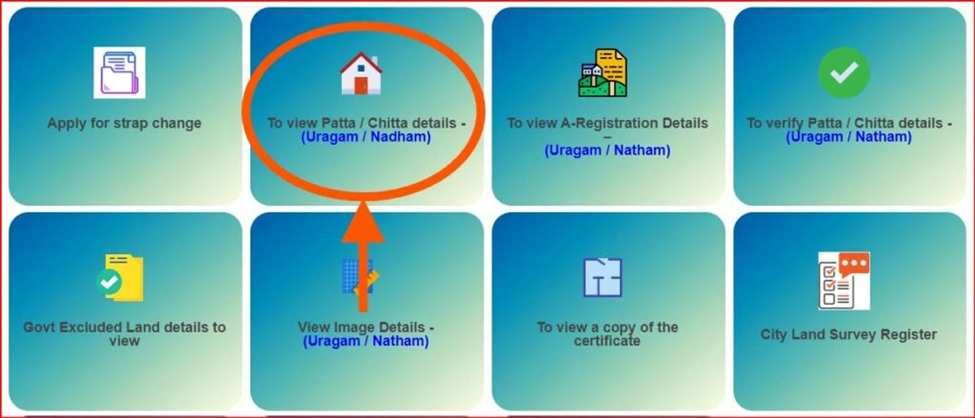
The process takes about three minutes once you have your Survey Number or Patta Number ready. If you do not have these, check an older utility bill, sale deed, or ask the village administrative officer (VAO) — they can usually tell you on the spot.
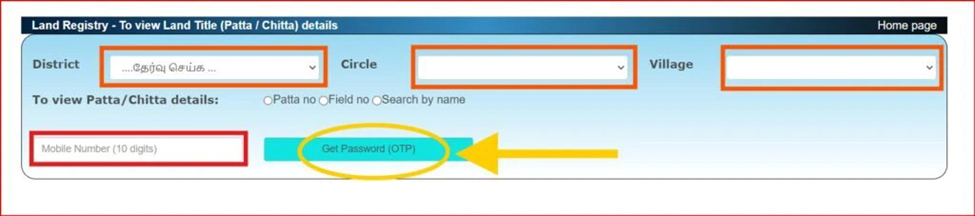
- Open eservices.tn.gov.in in your browser
- Click “View Patta/Chitta” from the menu
- Select Rural (village or agricultural land) or Urban (city/town plot)
- Choose your District, Taluk, and Village from the dropdowns
- Enter your Survey Number and Sub-Division Number, or your Patta Number
- Complete the CAPTCHA — if it does not load, try refreshing the page once
- Enter your mobile number and click Send OTP
- Type in the OTP — it usually arrives within 30 seconds, but can take up to 2 minutes during peak hours (mornings and lunch hours are the busiest)
- Your Patta Chitta appears on screen
Tip: If you get an error saying “No record found”, double-check whether your land is Rural or Urban. Choosing the wrong one is the most common mistake.
Tip: The portal sometimes runs slowly on weekday mornings. Early evenings (6–8 PM) usually work faster.
How to Download Patta Chitta
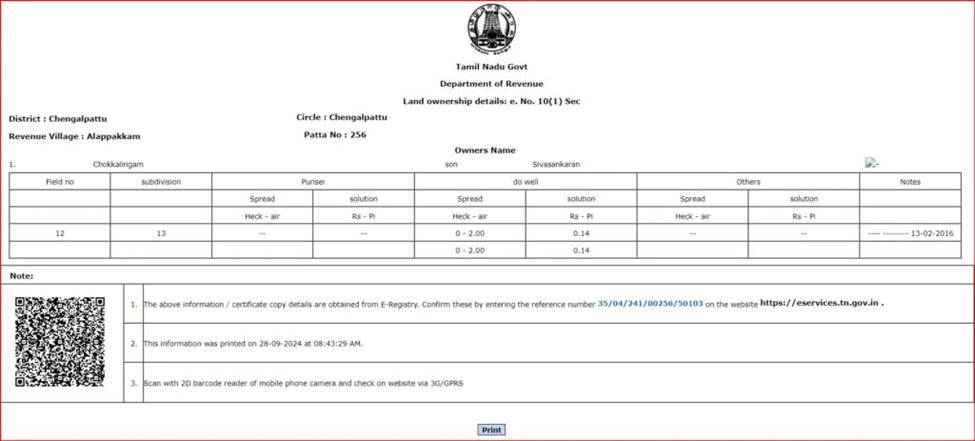
Once your record is on screen, hit Download or Print. It saves as a PDF. The download is free — there is no charge for viewing or saving your Patta Chitta.
For urban land in cities like Chennai or Coimbatore, your document will be a TSLR Extract rather than a standard Patta Chitta. The download process is the same, but you select “TSLR Extract” from the portal menu instead.
Note: The downloaded PDF is for reference only. For legal submissions, you may need a signed hard copy from the Tahsildar’s office. Ask the receiving party what they specifically accept before downloading.
How to Apply for Patta Transfer Online
Bought a piece of land? Inherited it from a family member? The Patta Chitta still shows the previous owner’s name until you formally apply for a transfer. This is called a Patta Transfer, and it is important to do it promptly after any ownership change.
Delays in transferring Patta can create complications when you try to sell the land later, or when the property passes to the next generation.
- Go to eservices.tn.gov.in and log in — or create an account if you do not have one
- Select “Apply Online Patta Transfer”
- Fill in your details (the new owner) and the current owner’s details as shown in the existing Patta
- Enter the land details: District, Taluk, Village, and Survey Number — these must match the existing Patta exactly
- Select the reason for transfer: Purchase, Gift, or Inheritance
- Upload your documents (see the list below)
- Pay the fee online
- Submit and note down your Application ID — you will need this to track status
Tip: Processing time is typically 30 to 45 days. If your application is pending beyond 60 days, visit the Tahsildar’s office in person with your Application ID and ask for an update.
Documents Required
If You Purchased the Land
- Registered Sale Deed (the main document proving the transaction)
- Encumbrance Certificate — get this from tnreginet.gov.in, not the e-Services portal
- Aadhaar Card or Voter ID of the new owner
- Existing Patta Chitta copy of the land
If You Inherited the Land
- Legal Heir Certificate — issued by the Revenue Divisional Officer (RDO)
- Will, if one exists
- Aadhaar Card of all legal heirs
- No Objection Certificate (NOC) from other legal heirs if applicable
Note: A common reason for rejection is a mismatch between the name on the Sale Deed and the name on the existing Patta. Even a small spelling difference can cause delays. Make sure these match before submitting.
Fees
| Service | Fee |
| Viewing Patta Chitta or TSLR Extract online | Free |
| Downloading Patta Chitta or FMB Sketch | Free |
| Patta Transfer application | Rs. 100 – Rs. 300 (varies by district) |
| If applying through a CSC (Common Service Centre) | Additional Rs. 25 – Rs. 60 service charge |
Tip: CSC centres are available in most taluk towns if you find the online process difficult. The extra service charge is worth it for first-time applicants who want someone to help with the upload process.
How to Get the FMB Map (Patta Chitta FMB)
The FMB (Field Measurement Book) sketch is essentially a hand-drawn survey map of your land showing its exact boundaries, dimensions, and neighbouring plots. It is most commonly needed when a boundary dispute comes up with a neighbour, or when you are planning to build and need to know where exactly your land ends.
For most rural land transactions, getting the FMB alongside the Patta Chitta is a good habit — it tells the full story of the land’s physical boundaries.
- Go to eservices.tn.gov.in
- Select “View FMB Sketch”
- Choose Rural or Urban (most FMB requests are Rural)
- Enter your District, Taluk, Village, Survey Number, and Sub-Division Number
- Complete CAPTCHA and OTP verification
- View or download the sketch
Note: FMB sketches on the portal are scanned versions of older paper records. For some older or rural lands, the scanned image may be blurry. In that case, you will need to visit the District Survey Office for a certified physical copy.
How to Verify a Patta Chitta Document
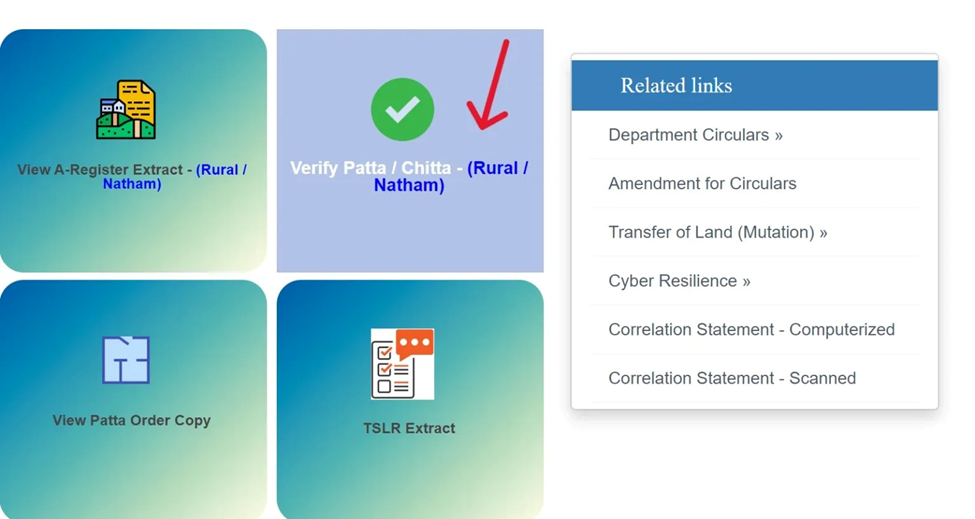
This is one of the most underused features on the portal — and one of the most important. If someone is trying to sell you land, you should always verify their Patta Chitta before paying anything.
- Go to eservices.tn.gov.in
- Click “Verify Patta/Chitta”
- Enter the Reference Number printed on the document
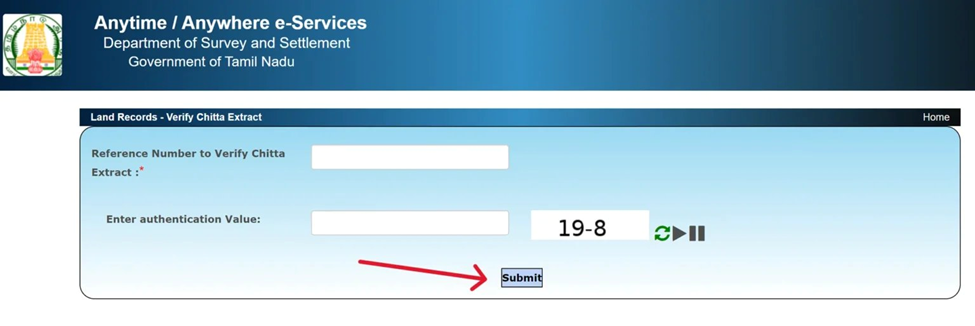
- Enter your mobile number and verify via OTP
- The portal will confirm whether the document matches the records in the government database
Note: If a seller is reluctant to share their Patta Chitta reference number for verification, treat that as a serious warning sign. Fraudulent or forged documents have been used in land scams in Tamil Nadu — verification takes two minutes and can save you from years of legal trouble.
Patta Chitta and Encumbrance Certificate (EC) — Use Both
Patta Chitta tells you who owns the land right now. The Encumbrance Certificate (EC) tells you the land’s financial and legal history — whether it has been mortgaged, whether there are any legal disputes registered against it, whether it was used as collateral for a loan that has not been fully paid off.
Both documents together give you the complete picture before a purchase. You can get the EC from tnreginet.gov.in (the Tamil Nadu Registration Department portal). Request an EC for at least the last 13 years to cover the standard legal review period.
Tip: Ask your lawyer or document writer (“Document Writer” offices are common near registration offices in Tamil Nadu) to help you read the EC — it is written in a format that is not always easy to interpret on your own.
Types of Land in Patta Chitta
Your Patta Chitta will show a land classification. Here is what each type means in plain terms:
| Land Type | What It Means in Practice |
| Natham / Grama Natham | Residential land inside a village. Houses in rural Tamil Nadu are mostly on Natham land. |
| Wet Land (Nilavaram) | Irrigated farmland — paddy fields, land near canals. Converting this to residential use requires special permission. |
| Dry Land (Maruthal) | Rain-fed agricultural land. Easier to convert for non-farm use compared to wet land, but still needs approval. |
| Urban (Nagaram) | Land inside a municipal or city area. Governed by CMDA or DTCP rules. |
| Poramboke | Government land — roads, water bodies, commons. Cannot be owned by any private person. If a Patta shows Poramboke land, it is invalid. |
Note: Do not buy land that is classified as Poramboke regardless of what the seller tells you. The government can reclaim it at any time without compensation. This has happened in several cases near lake and river boundaries in Tamil Nadu.
Patta Chitta by City and District
Chennai
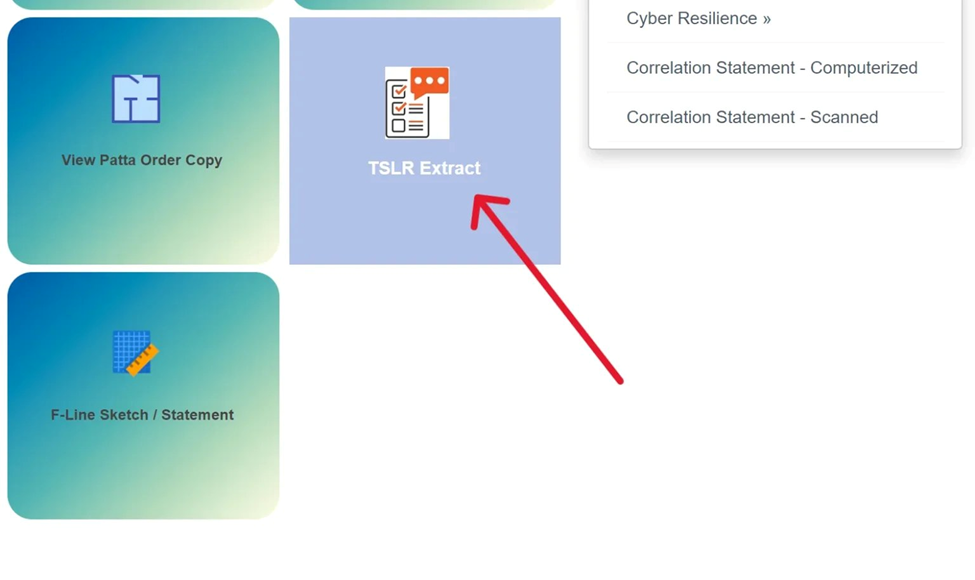
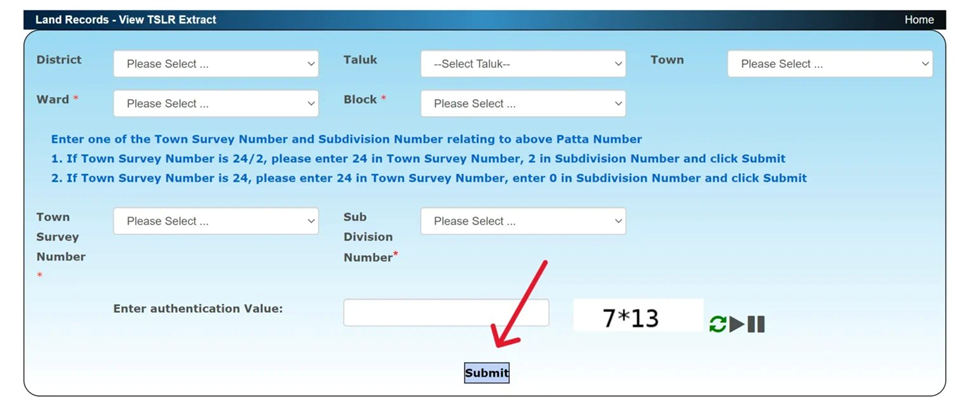
Most land in Chennai falls under the Town Survey Land Register (TSLR) system, not the standard rural Patta Chitta. On the portal, select “TSLR Extract” and enter your Ward number, Block number, and Town Survey Number. These details are on your property tax receipt or can be obtained from the BBMP/Corporation office.
Coimbatore
Coimbatore has both urban and rural zones. For land inside the Coimbatore city limits, use TSLR Extract. For land in surrounding rural areas — Mettupalayam, Pollachi, Annur — use the regular Patta Chitta option with Rural selected.
All Other Districts
The process is consistent across all 38 Tamil Nadu districts. Pick your district, taluk, and village from the dropdown on eservices.tn.gov.in. If your village does not appear, it may be listed under a nearby larger village or a different administrative name — ask your VAO or local revenue office for the correct listing.
Patta Chitta Mobile App
The Tamil Nadu government offers a mobile app called “Tamil Nadu Land Records” available on both Android and iOS. It lets you view and download Patta Chitta, check FMB maps, and track transfer application status directly from your phone.
Newer Patta Chitta documents also carry a QR code. Scanning it takes you directly to the verification page for that specific document — no need to type in the reference number manually.
Tip: The app is particularly handy at property site visits. You can pull up the Patta Chitta and FMB on your phone right there and compare the document with the physical land boundaries.
Contact and Support
If you are stuck or facing an error on the portal, here are your options:
Helpline: 1100 (Tamil Nadu government general helpline)
Email: dir-sur@nic.in (Survey Department)
Address: Survey House, Chepauk, Chennai – 600005
Official Portal: eservices.tn.gov.in
Tip: For most issues, calling 1100 and explaining your problem is faster than email. If the portal is down entirely, try again after a few hours — maintenance usually happens in the early morning.
Common Questions
What is the difference between Patta and Chitta?
Patta is the ownership side — it says who owns the land. Chitta is the physical description side — it says how big the land is, what type it is, and what taxes apply. They were separate documents for decades and are now merged into one combined Patta Chitta record.
How do I view Patta Chitta online?
Go to eservices.tn.gov.in, click “View Patta/Chitta”, choose Rural or Urban, enter your Survey Number or Patta Number, and verify with an OTP. The whole process takes about three minutes.
Is downloading Patta Chitta free?
Yes, completely free. You can view and download as many times as you want. There are no hidden charges on the portal for viewing or downloading.
How do I track my Patta Transfer application status?
Use your Application ID on the portal under “Application Status”. If the status has not updated in more than 45 days, go to the local Tahsildar’s office with your Application ID and ask directly — that is usually the fastest way to get a resolution.
What if I do not know my Survey Number?
Check your old Sale Deed, property tax receipt, or any previous Patta Chitta document you might have. Your village administrative officer (VAO) can also tell you the survey number for your land — just describe the location and they can usually look it up.
My name on the Patta Chitta is spelled differently from my Aadhaar. Is that a problem?
It can be — especially for loan applications and future transfers. You should apply for a name correction by submitting a declaration along with supporting documents at the Tahsildar’s office. It is better to fix this early before it becomes an obstacle in a transaction.
What is TN Patta Chitta?
TN Patta Chitta just means Patta Chitta in Tamil Nadu — people often search it this way to find the Tamil Nadu-specific portal. The official system is at eservices.tn.gov.in and covers all 38 districts of the state.
Can I access Patta Chitta from outside Tamil Nadu?
Yes. The portal is accessible from anywhere with an internet connection. You just need your Survey Number or Patta Number and a mobile number that can receive the OTP.
Is this website affiliated with the Tamil Nadu government?
No. checkpattachitta.com is an independent guide that explains how to use the official Tamil Nadu e-Services portal. All the actual Patta Chitta services — viewing, downloading, applying — happen on eservices.tn.gov.in. We do not store or process any of your land records.
The portal says ‘No record found’. What should I do?
First, check whether you selected Rural or Urban correctly — this is the most common cause. Second, verify that you have the right Survey Number and Sub-Division Number. If the issue persists, your land records may not yet be digitised, which still happens in a few older rural areas. In that case, visit the Village Administrative Office or Tahsildar’s office for a physical copy.